

Zendesk comes with a reliable built-in Approval Requests feature. For straightforward, single-level approvals, this is usually enough. The Gravity CX team sees SweetHawk as a way to extend Zendesk by covering needs that the native tools miss. As your approval process becomes more complex, the difference between the two options becomes more noticeable.

Key Takeaways
- Zendesk’s native Approval Requests feature works well for single-level approvals, but it doesn't support multi-step chains, conditional routing, or a compliance-grade audit trail.
- SweetHawk Approve adds specialised approval features directly to Zendesk tickets, including multi-step chains, automatic status updates, and email prompts for approvers.
- The difference between Zendesk and SweetHawk becomes much greater as your approval process gets more complex, your volume increases, or your compliance needs grow.
- Since 2015, SweetHawk has created 17 Zendesk-only apps, now used by over 300,000 active agents in more than 12,000 organisations worldwide, including many Australian enterprise and mid-market teams.
- The best option depends on your needs. Some teams use both tools for different types of requests.
Approval Workflows in Zendesk: Knowing Which Tool to Reach For
Zendesk is a strong platform for customer support and service management. Its built-in Approval Requests feature covers many approval scenarios, and Zendesk continues to add new features. However, as approval workflows become more complex, many organisations choose to add Marketplace apps to extend Zendesk’s capabilities.
This is where SweetHawk comes in. Choosing between native Zendesk and SweetHawk is not about which is better, but about finding the right tool for your level of complexity.
What Native Zendesk Gives You for Approvals
Zendesk offers several features that, when used together, can help you set up approval processes.
Native Approval Requests
Zendesk has a built-in Approval Requests feature. This is a dedicated approval tool. It is available on Employee Service Suite Growth plans and higher, as well as Customer Service Suite Professional plans and above.
When an agent needs to make a decision, they can send an approval request directly from the ticket. The approver receives an email and can approve or reject without using Zendesk every day. The decision is saved on the ticket, creating an audit record ready for compliance.
Recent updates now allow group-based approvals, so any member of an approver group can respond. Field character limits have increased, and you can now share direct links to approval requests. For the latest details, check Zendesk’s approval request release notes.
Where native approvals stop short:
- No multi-step chains (e.g. line manager sign-off → finance director sign-off)
- No conditional routing based on ticket field values
- No structured reporting on approval cycle times or bottlenecks
- Limited configuration options compared to purpose-built tools
Side Conversations
Side conversations let agents bring in approvers via email or Slack without giving them Zendesk access. Approvers reply by email, and their response is saved in the side conversation thread. However, there is no structured outcome, no automatic status update, and no audit record beyond the email thread.
Triggers and Automations
Triggers can respond to ticket status changes or tag additions by sending notifications to approvers or updating ticket fields. With custom statuses and tags, you can set up a basic approval notification process. However, triggers cannot enforce outcomes or create conditional logic for multiple approval steps.
Ticket Forms and Custom Fields
Ticket forms let you collect structured information when a request is submitted, which helps with routing. You can use a custom field to record the requester’s department or request type and send it to the right team. This is a basic need for any approval workflow, and Zendesk handles it well.
What SweetHawk Adds
Since 2015, SweetHawk has built 17 Zendesk-only apps, now used by over 300,000 agents in more than 12,000 organisations worldwide. Their apps are designed to look and feel like part of Zendesk, so many agents do not even notice they are using a third-party tool. SweetHawk Approve is a Zendesk Marketplace app that installs directly into your Zendesk and adds a dedicated approval panel to each ticket.
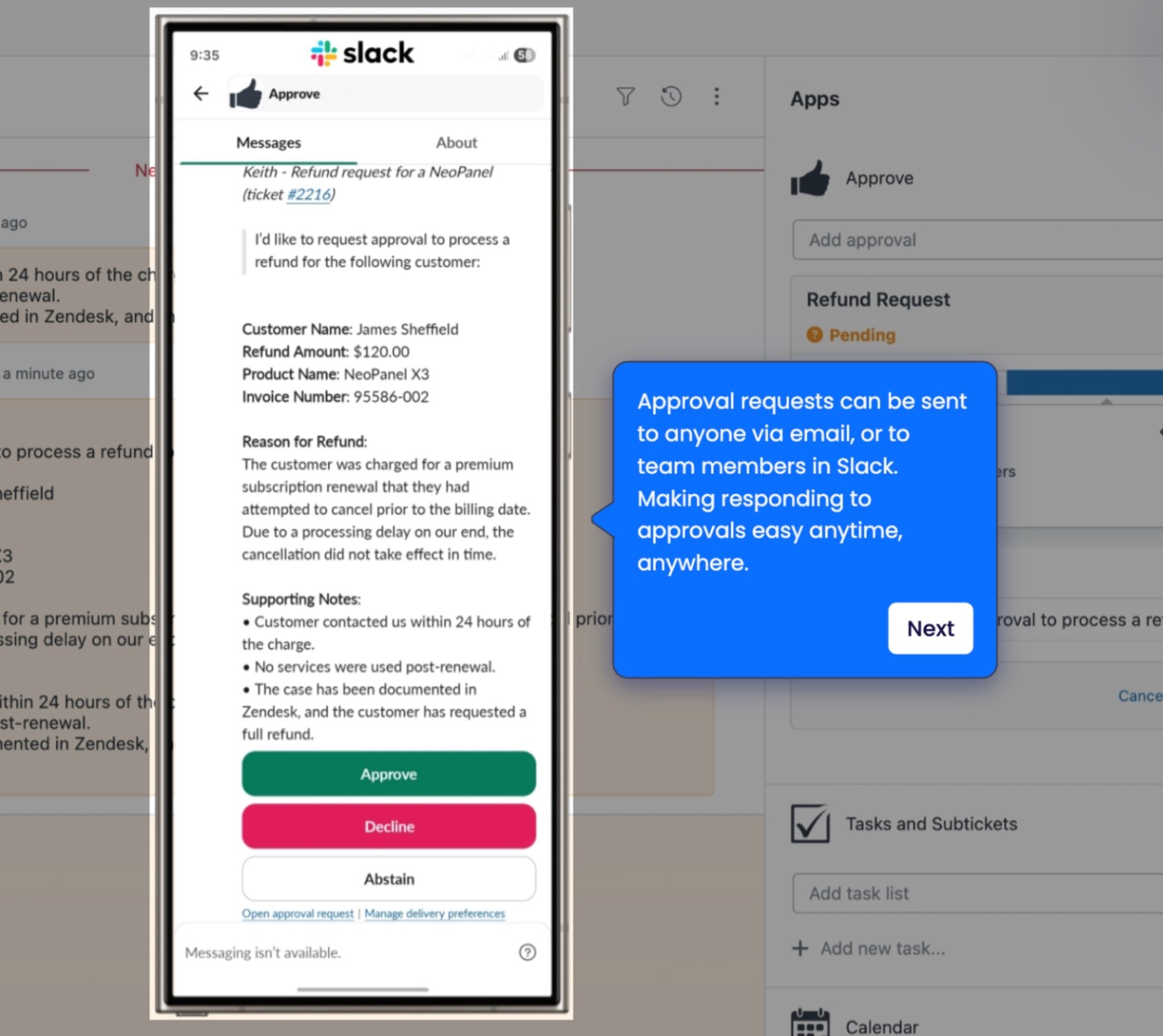
Purpose-Built Approval Panel
Inside each ticket, agents see a clear approval request section. They can choose one or more approvers, decide if all or just one needs to approve, and send the request. Approvers get a simple email with an approve or reject button, and they do not need to log in to Zendesk.
When the approver responds, the ticket status updates automatically. The agent does not need to do anything manually.
Multi-Step and Conditional Approval Chains
SweetHawk supports approval chains in order, so a request may need sign-off from a line manager before it goes to a finance director. It also allows conditional routing based on ticket field values. For example, requests over a certain amount can automatically trigger a second approver.
Native Zendesk cannot replicate this without significant custom API development.
Dynamic Approver Assignment
One of SweetHawk’s most powerful and often overlooked features is dynamic approval routing. Instead of creating a separate approval template for every employee, team, or cost centre, you can set up a single template that uses an organisation or user field in Zendesk. The app checks who the approver is for that group or person at the time of the request and routes it automatically.
A single approval template can serve the whole organisation and automatically route requests, so you do not need to update it as team structures change.
Structured Audit Log
Every approval action, such as requests sent, approved, rejected, or escalated, along with timestamps and approver identity, is saved in a structured audit log. This is what compliance teams in Australian financial services, healthcare, and government need. Native Zendesk’s ticket history records actions, but it is not set up for compliance reporting.
Approver Experience
SweetHawk’s emails to approvers are clear and easy to use. Approvers can make a decision with just one click. This is important for teams where approvers are senior staff who do not use Zendesk often. Making the process easy for approvers is a key reason approval workflows get used.
Head-to-Head Comparison
| Capability | Native Zendesk | SweetHawk Approve |
| Dedicated approval feature | Yes (Approval Requests — ESS Growth+ / CS Professional+) | Yes (Marketplace app, all plans) |
| Approval status tracking | Yes — tracked on ticket | Yes — tracked on ticket |
| Multi-step approval chains | No | Yes |
| Conditional approver routing | No | Yes |
| Dynamic approver assignment (org/user fields) | No | Yes |
| Group-based approvals | Yes (recent enhancement) | Yes |
| Approver login required | No (email-based) | No (email-based) |
| Audit trail for compliance | Basic — decision recorded on ticket | Structured approval log with timestamps |
| Setup complexity | Low — native, no installation | Low (Marketplace app) |
| Cost | Included in an eligible Zendesk plan | SweetHawk licence fee (per agent/month) |
| Best fit | Single-level approvals, eligible plan holders | Multi-step, conditional, or compliance-heavy workflows |
When Native Zendesk Is Enough
Not every team needs SweetHawk. Zendesk’s built-in Approval Requests feature covers the main use case well, and if you are already on an eligible plan, there is no extra cost or setup needed.
Native Zendesk works well when:
- If you’re on Employee Service Suite Growth or Customer Service Suite Professional (or above), the feature is already available to you
- You need single-level approvals, one approver per request type
- Your compliance requirements are met by a basic decision record on the ticket
- Your approval volume is manageable, and workflows are straightforward
The risk is that organisations start with native approvals for a simple use case, but then their needs grow, such as needing a second approver, conditional routing by amount, or a proper audit trail for compliance.
At that point, they have to add SweetHawk to their existing workflows. If you are in a regulated industry or expect your approval process to get more complex, it is a good idea to plan for SweetHawk from the beginning.
When SweetHawk Is the Right Call
SweetHawk earns its place when:
- You need multi-step or conditional approval routing
- Compliance or audit requirements apply to financial services, healthcare, government, or any SOC 2/ISO 27001 environment
- Approvers are senior stakeholders who need a simple, email-based experience
- You’re running more than one approval workflow type across multiple departments
Australian enterprise teams often find they need these features sooner than expected. What begins as an IT access request workflow can quickly expand to HR, procurement, and vendor management within the first year.
A Note on SweetHawk’s Full Suite
SweetHawk offers 17 Zendesk apps in addition to Approve, such as Tasks & Subtickets, Survey, Calendar, and Power Actions. Teams that need to complete subtasks and obtain approvals, such as IT onboarding workflows that combine task lists with manager sign-off, often use several SweetHawk apps together.
Keep this in mind if your approval workflows are part of a larger service delivery process.
Related Reading
For more context on how approvals fit into your broader Zendesk architecture:
- Zendesk Implementation Costs, Timeline & What To Expect
- Zendesk AI Agent Advanced Guide
- Building an Effective Customer Support Department
Frequently Asked Questions
Is SweetHawk Approve available on all Zendesk Plans?
Can native Zendesk handle compliance-grade approval audit trails?
Zendesk’s native Approval Requests feature records approval decisions on the ticket, giving you a basic audit trail. However, it is not set up as a formal compliance log. It does not include detailed timestamps, identity tracking of approvers, or an exportable audit report format that financial services, healthcare, and government organisations often need. For teams with formal compliance reporting needs, SweetHawk’s structured audit log is a significant improvement.
Does SweetHawk require approvers to have a Zendesk licence?
No. SweetHawk sends approvers an email with an approve or reject button. They can respond without logging into Zendesk. This is one of SweetHawk’s most practical benefits for organisations where approvers are senior staff or external parties.
How long does it take to implement SweetHawk Approve in an existing Zendesk instance?
It depends on what you are building. According to a recent Gravity CX webinar, a simple workflow can be set up in just 5 minutes, while a more complex multi-step process might take up to 5 days. A basic single-approver flow is quick to launch, but a multi-step chain with conditional routing and dynamic approver fields takes more time. Usually, the design phase, planning approval logic, approver groups, and edge cases take longer than the actual setup.
Can you run native Zendesk and SweetHawk side by side?
Yes. Some Australian teams use native Zendesk approval flows for informal internal requests and SweetHawk for formal, compliance-focused approvals. The two methods do not conflict, but using both can make operations more complex. We usually suggest choosing one approach for your organisation if possible.
Want Help Deciding Which Approach Is Right for Your Team?
The best approval tool for you depends on your workflows, compliance needs, and Zendesk setup. A 30-minute chat with our team is usually enough to give you a clear recommendation. Book a free Zendesk consultation with Gravity CX.
We work with Australian enterprise and mid-market teams in retail, financial services, government, and technology.