


Zendesk now includes data masking for light agents. This gives support teams better control over sensitive customer data and helps them meet privacy, security, and compliance standards.
Key Takeaways
- Zendesk now supports data masking for light agents, not just full agents.
- Sensitive customer data can be hidden without deleting it.
- Helps teams meet GDPR and data protection requirements
- Reduces internal data exposure and security risk
- Available through Zendesk’s Advanced Data Privacy and Protection (ADPP) add-on
- Gravity CX helps teams configure and apply this update correctly.
Customer data privacy is now a key part of the customer experience. People want quick answers, but they also expect their personal information to be protected. Meanwhile, privacy laws are stricter, and internal teams are growing and becoming more complex.
Zendesk’s new update, which adds data masking for light agents, is a useful improvement. It lets businesses control who can see sensitive customer data, without slowing down support or changing how teams work.
At Gravity CX, we help organisations balance great customer service with strict data access rules. This update makes that easier, especially for teams using Zendesk in different roles, departments, or regions.
What Is Data Masking in Zendesk?
Data masking in Zendesk hides personally identifiable information (PII) from certain users.
This can include:
- Email addresses
- Phone numbers
- Customer names
- Custom fields that store sensitive information
The main thing to remember is that the data is still there. It just isn’t shown to users who don’t need to see it.
For example, if a light agent reviews a ticket, they might see a masked email address instead of the real one. This keeps the context of the request but limits exposure to personal data.
Zendesk announced this expansion in its official update on data masking for light agents, confirming it is included within the ADPP add-on.
What’s Changed: Data Masking for Light Agents
Before this update, data masking was mostly used for custom roles. Light agents, who often help with internal collaboration, were not included for approvals or limited access.
With this update, Zendesk now allows admins to apply data masking to:
- Light agents
- Custom roles
- Other restricted user types
This is a meaningful change for organisations that rely on light agents for:
- Internal ticket reviews
- QA checks
- Finance approvals
- Product or operations input
At Gravity CX, we often see light agents working in teams outside of support. Now, you can limit what personal data they see without taking away their access, making Zendesk safer and more flexible.
Would you like to see Data Masking in action? Book a free consultation.
Why This Update Matters for CX and Support Teams
Support teams now work closely with other groups. Zendesk is used by finance, product, legal, and leadership teams, and many of these users don’t need access to personal customer data.
This update brings three main benefits.
1. Easier Compliance With Privacy Laws
Privacy regulations like GDPR require organisations to limit access to personal data to only those who need it. Data masking helps enforce this automatically inside Zendesk.
Masking PII for light agents helps teams lower compliance risk without needing extra manual steps or workarounds.
Zendesk explains the fundamentals of this feature in its guide on how data masking works within the ADPP add-on, which outlines what data can be hidden and how it supports privacy standards.
2. Clearer Role-Based Access Control
Not every Zendesk user needs to see all information.
With data masking for light agents, admins can set access based on actual job roles. For example:
- A finance user can approve refunds without seeing emails or phone numbers.
- A product manager can review ticket trends without accessing personal details.
- A QA reviewer can audit tickets safely.
At Gravity CX, we help customers set up Zendesk roles that match how their teams work. This update makes those setups simpler, safer, and easier to manage.
Zendesk also provides a detailed walkthrough on how to configure and turn on data masking in Admin Centre, which Gravity CX often supports as part of Zendesk optimisation projects.
3. Lower Risk of Internal Data Exposure
The more people who can see personal data, the higher the risk.
Masking PII for more roles helps prevent problems from human error, wrong permissions, or account issues. Even if someone gets access by mistake, the data stays protected.
Zendesk’s Data Privacy and Security Report highlights that businesses that prioritise data protection build stronger customer trust, a trend Gravity CX sees reflected in customer satisfaction and retention metrics.
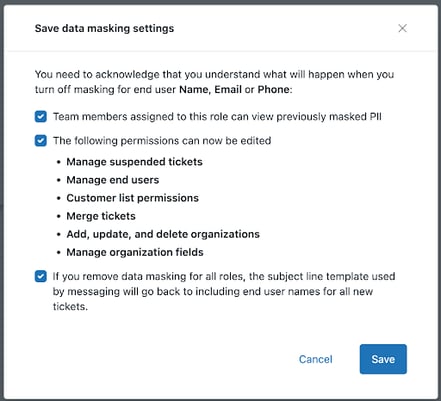
How Data Masking Works Day to Day
Once enabled, admins choose:
- Which fields should be masked?
- Which roles should see masked values?
Users with masked access can still see ticket timelines, internal notes, and the context of issues, but not the sensitive fields.
This keeps support workflows running smoothly and builds privacy into everyday work.
Zendesk also outlines its broader approach to protecting customer data across products in its overview of Zendesk customer data privacy and protection.
Why This Update Aligns With Gravity CX’s Approach
At Gravity CX, we build Zendesk environments that fit real teams, not just the default setups.
Data masking for light agents supports the best practices we already recommend:
- Limiting access based on role, not convenience
- Reducing unnecessary data exposure
- Designing Zendesk for long-term scale and compliance
For organisations in regulated industries or those with many customers, this update fixes a common problem we used to have to work around.
Who Should Use Data Masking for Light Agents?
This feature is especially valuable for:
- Companies with tiered or shared Zendesk access
- Businesses operating in the EU or other regulated markets
- Teams using light agents outside customer support
- Organisations preparing for audits or security reviews.
If your Zendesk setup has users who don’t need full access to customer data, you should consider this update.
How to Get Started
If you already have the Advanced Data Privacy and Protection (ADPP) add-on, data masking is not turned on automatically.
Admins need to:
- Open Zendesk Admin Centre
- Review data masking settings.
- Apply masking rules to light agents and relevant roles.
Zendesk offers a step-by-step guide for setting up data masking. Gravity CX can also help you review, set up, and test these settings as part of a full Zendesk review.
Want us to show you how this works? Book a free consultation.
Frequently Asked Questions
What is Zendesk data masking?
Zendesk data masking hides sensitive customer information from selected users while keeping the data stored securely in the system.
What types of data can be masked?
Common examples include email addresses, phone numbers, names, and custom fields containing personal information.
Is data masking available for all Zendesk customers?
No. Data masking for light agents is available to customers using the Advanced Data Privacy and Protection (ADPP) add-on.
Does data masking affect how agents support customers?
No. Agents still see the ticket context they need to respond effectively, just without unnecessary personal data.
Is data masking turned on automatically?
No. Admins must configure which fields to mask and which roles to affect.
Can Gravity CX help with setup?
Yes. Gravity CX works with teams to design role-based access, configure data masking, and ensure Zendesk supports both compliance and customer experience goals.
Final Thoughts
Zendesk’s new data masking for light agents is a practical update that matches how support teams work today. It gives businesses more control, reduces risk, and improves privacy without slowing down service.
For teams working with Gravity CX, this feature is part of our approach to building secure, scalable, and well-organised Zendesk environments that focus on trust.