

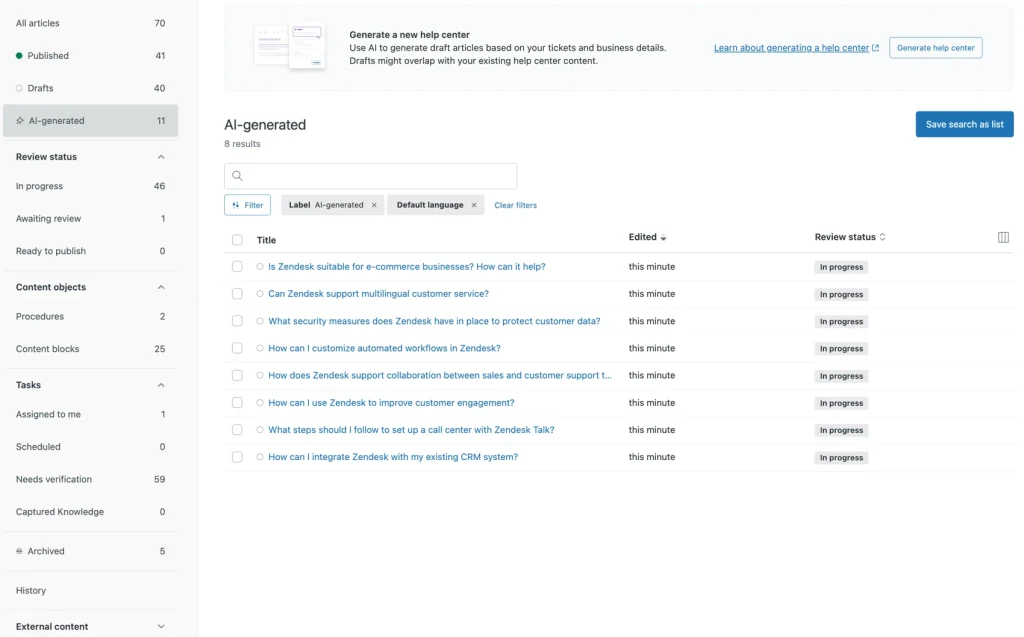
Zendesk has introduced Knowledge Builder, an AI tool that helps organisations quickly create or grow their help centres. It reviews support conversations from the last 30 days to generate draft articles, categories, and help centre layouts, making it easier to set up self-service content.
This article explains:
- What Zendesk Knowledge Builder does
- Where it excels
- Its natural limitations
What Is Zendesk Knowledge Builder?
Zendesk Knowledge Builder is an AI content tool in Zendesk Guide. It mainly helps teams to:
- Convert recent customer interactions into a structured help centre.
- Generate draft articles automatically.
- Identify common questions and support trends.
- Zendesk Knowledge Builder is great for teams setting up a help centre for the first time or wanting a quick start without writing content by hand.
Key Benefits of Zendesk Knowledge Builder
AI-Generated Articles from Real Tickets
It reviews support data from the last 30 days.
It creates up to 40 draft help articles based on real customer questions.
Automated Categories & Structure
It suggests help centre layouts, including categories, sections, and groups that make sense.
This means you don’t have to start from scratch.
Built-In Editing & Regeneration
You can adjust the tone, clarity, and format right inside Zendesk Guide.
You can make up to 10 AI-generated previews to compare different versions.
Multilingual Support
AI drafts are available in all languages Zendesk supports, which is helpful for global teams.
It integrates with your current Zendesk workflows, so you don’t need extra setup or external tools.
The tool works fully inside your existing Zendesk workspace.
Limitations of Zendesk Knowledge Builder
While Zendesk Knowledge Builder is helpful, its simple design brings some limits for many organisations:
Uses Only the Last 30 Days of Ticket Data
Zendesk cannot currently analyse:
- Historical support trends
- Seasonal issues
- Edge cases
- Legacy customers
- Known but infrequent problems
Cannot Pull Knowledge From Other Platforms
Most organisations store knowledge across different systems:
- Shared Inbox, Notion, Google Docs, GitBook, Jira
- Internal wikis, PDFs, shared drives.
Zendesk Knowledge Builder can’t access or learn from these sources.
Not Suitable for Multi-Brand or Complex Setups.
If your organisation has:
- Multiple brands
- Several help centres
- Diverse product lines
- A mix of tools and knowledge repositories
Zendesk Knowledge Builder works best for creating a single help centre. It isn’t made for extensive, multi-source documentation or complex setups.
Use Cases for Zendesk Knowledge Builder
Ideal for:
✔ Launching a help centre for a new company
✔ Teams with simple or centralised support processes
✔ Brands mostly or entirely using Zendesk
✔ Rapid content creation or prototyping
Less suitable for:
✘ Large-scale knowledge unification
✘ Multi-source documentation
✘ Multi-brand or multi-product organisations
Final Thoughts: Zendesk’s New Chapter in Knowledge
Zendesk Knowledge Builder helps teams quickly set up a help centre, speeding up content creation and enabling launch in just a few hours.
For multi-brand setups, complex systems, or organisations with many data sources, Zendesk’s AI might be too limited. In those cases, plan the help centre around every source your team relies on, not just the last 30 days of tickets.